Anchor · Smart Journal

Plan your day. Keep your word.

Most days slip away because nothing's decided. Anchor asks for three commitments each morning: one priority, one window of real work, one thing you won't do. Then it holds you to them. No overthinking. The day is simply decided.

Decide what matters, clear your head, and protect time to do it. Then turn the day you lived into something worth sharing.

Planning and journaling on iPhone and web. App blocking requires the iPhone app and Screen Time setup.

See a day in Anchor · 57 seconds · No audio

Share Your Day

Live your day.
Have something to share.

A run. A chapter studied. The everyday things you made time for. Turn your day into a card or a photo story, and choose what you share.

Three tools. One decided mind.

Anchor isn't another to-do list. It's the smallest set of commitments that make a day count, written down like you mean them.

01

Capture

Empty your head, not your ambition. The journal opens on a head full of noise, and as you write, it visibly clears. Fifty guided prompts for the honest part. Thoughts land before they slip away.

02

Today

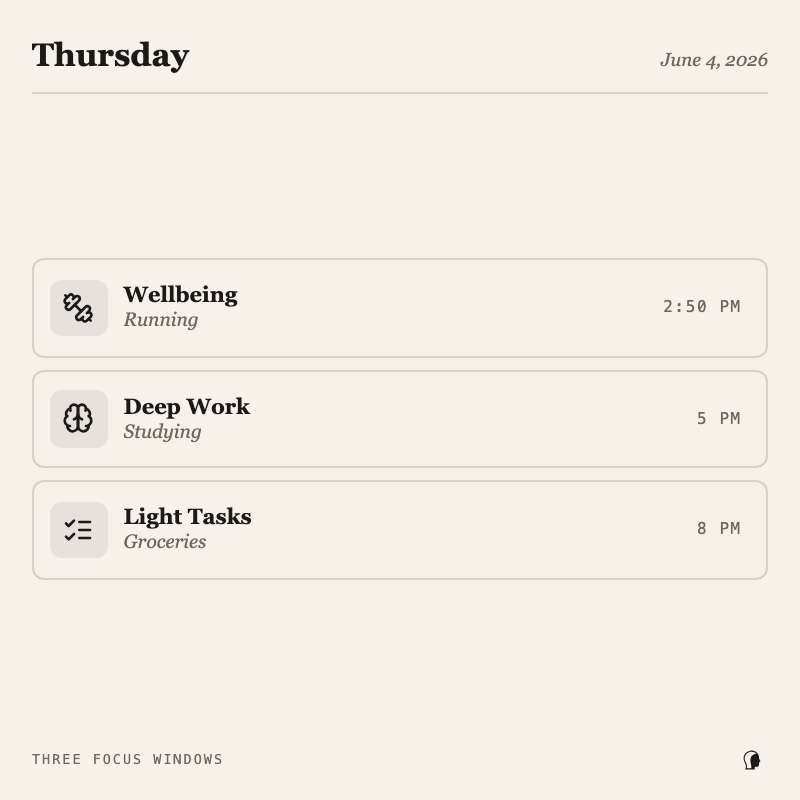
Say your day out loud: errands, workouts, deadlines, and watch it sort itself into three focus windows: Deep Work, Wellbeing, Light Tasks. One principal aim on top, so you always know what deserves your attention right now.

03

Focus

One task, zero noise, a running timer. Sessions from a fifteen-minute just-start to three unbroken hours of deep work. Sit down decided; stand up done.

04

The don't-do

Name the habit you're steering away from, one line, in writing. It stays on today's page, in plain sight, until the day is done. Restraint, made visible.

05

The seal

On iPhone, seal your distracting apps shut while you work, enforced by iOS itself, not willpower. Breaking the seal early means typing a 20-digit code by hand. The reach for the phone, interrupted.

How Anchor works.

Six ideas. Learn them once, and the app never needs explaining again.

01

One page a day

Anchor runs on a single page: today. Three focus windows give the day its shape: the body, the deep work, the small stuff. Adjust each window to fit your day.

02

The principal aim

Of everything today holds, one thing outranks the rest. Done, it carries most of the day's satisfaction on its own. A task, a habit, even just waking up early.

03

Write the mind down

Whatever's circling goes on the page, so it doesn't have to stay in your head. And the page is honest: once written, it's ink. Entries are never edited after the fact.

04

Sit down, seal the phone

Begin a session and, on iPhone, Anchor seals your distracting apps shut until it ends. The impulsive reach, removed. The phone becomes a tool for your goals.

05

Quiet, until it matters

Widgets keep the day on your home screen, and every reminder cancels itself the moment the thing is already done. A well-used day is a silent day.

06

Sunday

Rate the day, review the week, see the record grow. A day you can see is a day you can improve. That's the whole system.

Three tools. One day.

Plan it. Put your thoughts somewhere. Give one thing your attention.

01

Today

Choose one principal aim. Make space for Well-being, Deep Work and Light Tasks. Adjust each window to fit your day, and keep what you want to avoid in view.

02

Capture

Put what is circling in your head onto the page. Write freely or start with a question. A sentence is enough to begin.

03

Focus

Start a session for a task from Today, or open Focus on its own. Take fifteen minutes to begin. On iPhone, you can also block selected distracting apps after Screen Time setup.

A reason to return.

Remember the later things.

Keep dated items in Settings → Reminders. Bring one into today’s Light Tasks when you’re ready.

Keep the day in sight.

iPhone widgets put your plan on your home screen. Focus Live Activity keeps your session visible.

See what the day became.

Review today, look back over the week, and give tomorrow a starting point.

Personal by design.

Your journal and plans belong to your account. Sharing is your choice. Anchor uses product analytics and error reporting to understand what works, with text and inputs masked in session replay. No ads or advertising trackers.

Read what is collected and why →

A few things to know.

Can I try Anchor on the web?

Yes. You can plan, journal and focus in your browser. Guest access lets you start before creating an account; after three days, save an account to continue.

Is app blocking available on the web?

App blocking is an iPhone feature using Apple’s Screen Time controls. You grant permission and choose the apps to block. The web timer works without app blocking.

Where do I find Reminders?

Open Settings, then Reminders. Add a dated item for later, or choose “Add to today” to bring it into your Light Tasks.

Can I edit a journal entry?

Entries stay as written. You can delete an entry within five minutes of saving; after that, individual entries are permanent. Account deletion remains available in Settings.

Do I have to share my day?

No. Sharing is optional. Preview a day card or personal photos and choose whether to save or share it. Anchor does not post it automatically.

Where can I check pricing?

Check the options shown in the app before purchasing. Any available subscription price and trial terms are displayed there.

Give today a starting point.

One thing that matters. A little room for yourself.